
“There are photos of you” — The Telegram Link Scam That Steals Accounts (and How to Recover)
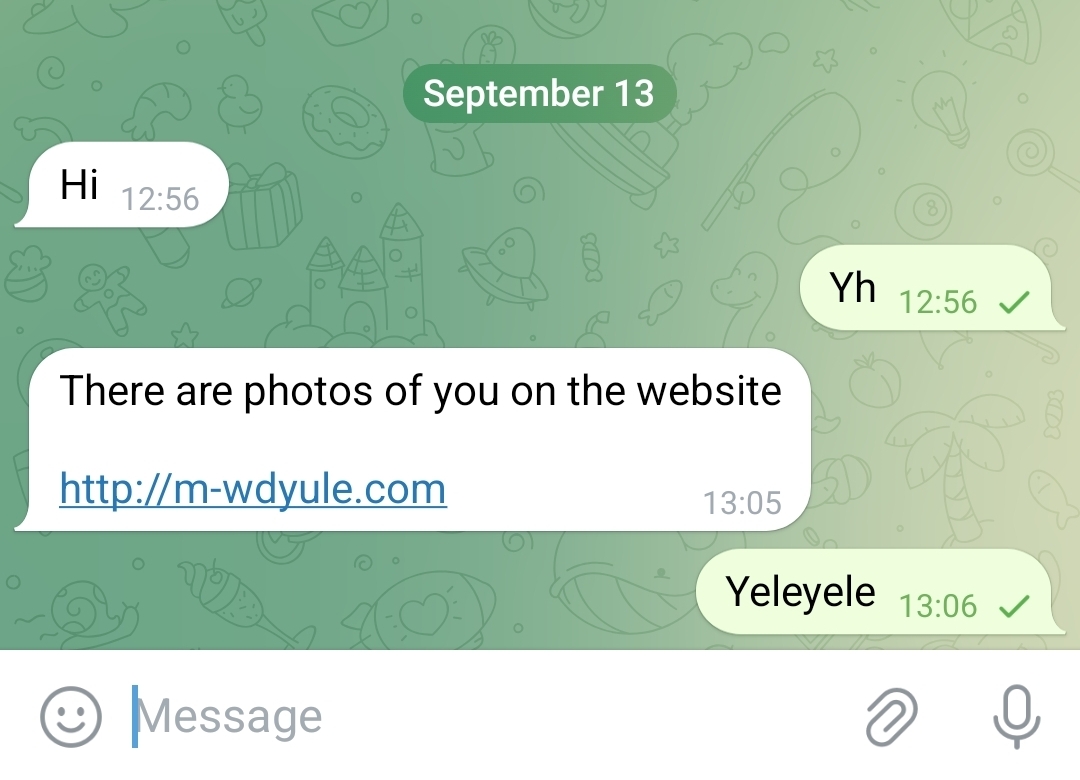
Recently many Telegram users have reported short, alarming messages such as “There are photos of you on the website” followed by a link. These messages are typically phishing attempts built to hijack accounts quickly by tricking users into handing over login codes, scanning a QR code, or entering passwords.
Why this scam works
The message is short, urgent and emotionally loaded — curiosity or fear triggers many people to click first and think later. The link often leads to a fake page that either:
- asks you to enter the SMS/login code Telegram just sent you,
- requests your Telegram password or a “two-step verification” password,
- or displays a QR code and asks you to scan it with your Telegram app (which immediately gives the attacker control).
Immediate actions if you received the message
- Do not click the link. If you already clicked, do not enter any codes or passwords.
- If you typed a code: assume your account is compromised and follow the recovery steps below immediately.
- Warn your contacts: send a short message telling them to ignore messages from your account until you confirm it's secure.
How to secure your Telegram account — step by step
Follow these exactly in the Telegram app or desktop client:
- Open Telegram → Settings → Devices / Active Sessions. Terminate any sessions you don't recognize. This will log attackers out instantly.
- Enable Two-Step Verification (a separate password). Settings → Privacy and Security → Two-Step Verification. Pick a strong, unique password and add a recovery email.
- Change your email and other recovery account passwords if they are the same or linked. Protect the email used for recovery with 2FA.
- Lock your SIM: contact your mobile carrier and set a SIM PIN or extra account security to prevent SIM-swap attacks.
- Check apps on your phone: uninstall unknown apps and run a reputable mobile malware scanner if you suspect a malicious app.
- Report to Telegram: Settings → Help → “Ask a question” (or use the official support channels) and report suspicious messages and account compromise.
What to do if your account was already taken over
- Immediately terminate active sessions on a device you still control.
- Enable or reset Two-Step Verification and change linked email passwords.
- Tell your contacts you were hacked and that any recent messages from your account may be fraudulent. (Use the template below if helpful.)
- Look for suspicious activity such as new groups, forwarded messages, or unauthorized posts and delete them.
- If you cannot recover access, contact Telegram support from a fresh Telegram install or the Help page and provide details to prove account ownership.
How to spot similar phishing attempts in future
- Unexpected short messages promising shocking content + a link.
- Sender says “photos” or “video” then includes a URL that does not match official Telegram domains.
- Requests to forward or paste codes, or to scan QR codes shown in a webpage.
- Grammar, punctuation, or odd-looking domains (extra letters, unfamiliar top-level-domains).
Longer-term protections
- Use unique passwords and a trusted password manager.
- Enable 2FA on all important accounts (email, social, banking).
- Keep your phone OS and apps updated to reduce malware risk.
- Train yourself (and family/friends) not to share one-time codes or passwords with anyone.
- Set up SIM lock / carrier-level protections to reduce SIM swap risk.
Final thoughts
These scams are built to exploit a single human reaction: curiosity or panic. If you pause, think, and verify before clicking or sharing codes, you'll stop most account takeovers in their tracks. If something happens, act fast: terminate sessions, enable two-step verification, and let your contacts know so the scam stops spreading.